So, it's finally time to get serious about automating your mobile engagement strategy. You sign up for a customer engagement platform, spend three weeks configuring it, connect a few channels, build a few journeys, and end up using maybe 10% of what the platform can do. Six months later, one journey is still running (nobody's sure if it's working), another was paused and forgotten, and the third is sending messages that overlap with a manual campaign someone set up last quarter.
Here's a welcome reality check.
Most small teams need three good messaging flows that cover their highest-leverage moments, and the discipline to not build a fourth until the first three are pulling their weight. Below, we cover how to pick those three, keep them lean, and know when they're ready for more.
Frequently asked questions about automated mobile engagement
What is autonomous lifecycle marketing?
Autonomous lifecycle marketing is the practice of automating your messaging across the entire user lifecycle, from onboarding through retention and re-engagement, so that each user receives relevant, behavior-triggered communication without manual intervention. The journeys described in this post are the building blocks of an autonomous lifecycle marketing strategy.
Do I need a customer engagement platform to build automated journeys?
Technically, you can piece together automations with separate tools for each channel. In practice, a customer engagement platform that manages push, email, SMS/RCS, and in-app from one system makes journey building significantly faster and prevents the coordination problems that come from stitching together multiple tools. OneSignal is built for this and offers a free tier to start.
How does OneSignal compare to Braze for small teams?
Braze is a powerful enterprise platform, but its implementation timeline and pricing are designed for larger organizations with dedicated marketing ops teams. Teams looking for Braze alternatives that offer faster setup, transparent pricing, and a visual journey builder that doesn't require dedicated technical resources often find that OneSignal covers their needs at a fraction of the cost. See our detailed Braze vs. OneSignal comparison.
Is OneSignal a good alternative to Klaviyo for mobile apps?
Klaviyo is primarily designed for ecommerce email and SMS marketing. If your app relies heavily on push notifications, in-app messaging, or cross-channel mobile journeys, Klaviyo alternatives like OneSignal are a better fit because those mobile-native channels are core to the platform rather than add-ons.
How does OneSignal compare to CleverTap?
CleverTap and OneSignal both offer cross-channel messaging and journey automation. The main differences are in setup speed and pricing accessibility. CleverTap alternatives like OneSignal tend to offer faster time-to-value, especially for small teams, with a simpler onboarding process and a free plan that includes core journey functionality.
How to decide what to automate first
Every team has a list of things they'd like to automate, but an (often unexpected) mistake is picking based on what sounds sophisticated. Smaller teams particularly must seek out areas of leverage: which moments generate the most user value (or recover the most lost value) relative to the effort of building the journey?
Consider the following criteria to help yourself prioritize where to start:
- Does this moment happen frequently enough to justify automation? A journey that fires twice a month isn't worth the setup time. One that fires hundreds of times a day is.
- Is there a clear action you want the user to take? If you can't define the desired outcome in one sentence, the journey will be unfocused and hard to measure.
- Are you currently handling this manually or not at all? Both are good candidates. If you're already doing it manually, automation frees up hours. If you're not doing it at all, you're leaving value on the table.
For most apps, this filter surfaces the same three moments: the first few days after signup, the moment a user abandons a high-intent action, and the period when an active user starts going quiet.
Build these three messaging flows before you build anything else
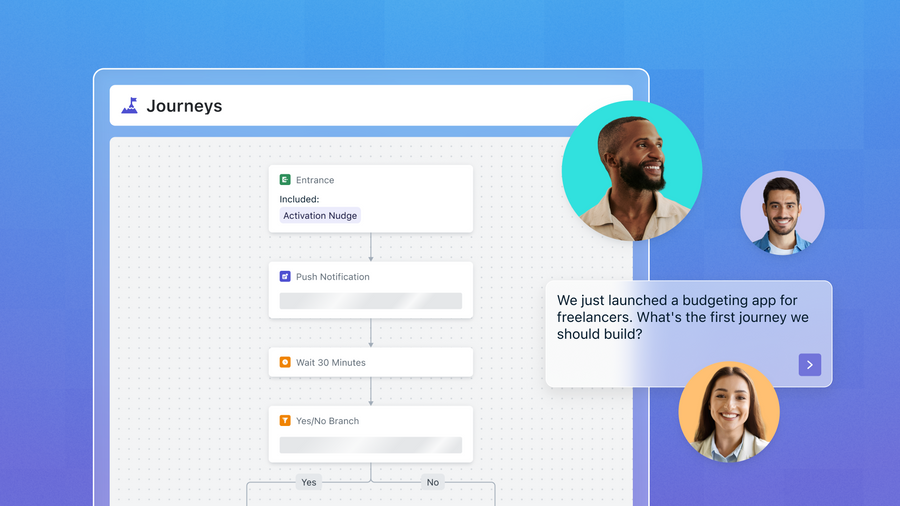
1. The activation nudge. Triggered when a new user signs up but doesn't complete a key action within the first 48-72 hours. The goal is to get them to the moment where your product clicks. Keep it to two or three messages across one or two channels. Push for urgency, email for context. Exit the user the moment they complete the target action so they don't get a nudge for something they already did.
2. The abandoned action recovery. Triggered when a user starts a high-value action (adds to cart, begins a booking, starts a form) and drops off. Send the first message within an hour while intent is still warm. Include something specific to what they abandoned, not a generic reminder. One follow-up is usually enough. If they don't convert after two touches, move on.
3. The quiet user re-engagement. Triggered when a previously active user's engagement drops below a defined threshold (session frequency falls, notification engagement declines, feature usage narrows). This one requires more patience. Start with a single, value-forward message that surfaces something relevant to their past behavior. If they re-engage, great. If not, shift them to a lower-frequency cadence rather than hammering them with reminders.
These three journeys cover the highest-stakes moments in most app lifecycles: getting new users activated, recovering high-intent actions, and catching users before they churn. Everything else is a refinement.
Three rules for journeys that run themselves
1. Set aggressive exit conditions. Every journey should have a clear exit trigger: the user completed the target action, opted out, or hit a time limit. Without exit conditions, users pile up in journeys that are no longer relevant to them, and you end up sending messages that feel stale or annoying.
2. Coordinate across journeys. A user should never be in all three journeys simultaneously. Use tags or exclusion logic to prevent overlap. If someone just signed up and abandons a cart in the same session, the abandoned action recovery should take priority over the activation nudge, since they've already shown higher intent.
3. Start with fewer messages than you think you need. You'd be surprised how well a two well-timed messages can compete with a five-step sequence. You can always add steps later based on data. What you can't do is un-annoy a user who received four messages in two days.
Your journeys are running. Are they working?
You don't need a complex analytics setup to monitor three journeys. Track one primary metric per journey:
- Activation nudge: What percentage of users who enter the journey complete the target action within the window?
- Abandoned action recovery: What's the recovery rate? How many users return and complete the action after receiving the message?
- Quiet user re-engagement: Of users who enter this journey, what percentage return to active status within 14 days?
If any of those numbers are flat or declining over a few weeks, that's your signal to look at the journey. Check whether the trigger timing is right, whether the message content is still relevant, and whether the exit conditions are actually firing. If a journey consistently underperforms after a few rounds of adjustments, kill it and try a different approach to that same moment rather than adding more steps to a broken flow.
How to know when you're ready to add more
Build the fourth journey when all three of the following are true: your first three are performing consistently, you can articulate a specific moment the new journey would address, and you have a clear metric to evaluate it. If any of those are missing, you're better off optimizing what you have.
Common fourth journeys for small teams include:
- A post-purchase or post-conversion follow-up,
- A milestone celebration (streaks, anniversaries, usage thresholds), or
- A feature adoption nudge for users who haven't discovered a key part of the product.
Each of these builds on the foundation your first three created.
Built for teams that can't afford to overthink it
OneSignal's omnichannel Journeys builder was designed for teams that need to move fast. You can build any of the three journeys described above in minutes with a visual, no-code builder that supports branching, behavioral triggers, cross-channel messaging (push, email, SMS/RCS, in-app), exit conditions, and tag-based coordination between journeys. We'll handle the logic so you and your team can focus on the strategy.
Get Started for Free