Last updated: June 2026
• Micro-journeys outperform traditional drip campaigns. Teams deploying Journeys that listen, escalate, and stop outperform sprawling campaign calendars. 63% of marketers get better results with fewer messages, and 78% see higher revenue.
• One goal per sequence, channel-aware delivery. The strongest automated messaging journeys focus on a single outcome and deliver each message on the channel that fits its intent: push for urgency, email for content depth, in-app for context.
• Exit conditions and user tags prevent message pile-up. Users who complete the goal should leave the Journey immediately, and tagging users as they progress lets other Journeys exclude them.
• A multi-channel customer engagement platform is the prerequisite. Building automated cross-channel journeys requires unified user data and a single orchestration layer for push, email, SMS/RCS, and in-app.
Onboarding tours, in-app tutorials, and deep product walkthroughs all have their place, and they work well for users who are already invested in your app. But a customer engagement platform needs to reach users at every stage of attention, not just the dedicated ones.
The larger group, the one that determines whether your engagement metrics trend up or flatten out, opens your app for 30 seconds between other things. The quick check while waiting for coffee, a scroll between meetings, a tap from a push notification that leads to maybe 20 seconds of actual attention.
That's where micro-Journeys come in. These are short, automated messaging sequences that span multiple channels, with every touchpoint designed to deliver value inside a single brief session.
This guide covers how to structure them and walks through three real examples you can build in OneSignal.
Why micro-Journeys outperform traditional automated messaging flows
Traditional engagement journeys tend to assume a linear path. User signs up, user gets a welcome email, user opens the app, user completes onboarding, user converts. It’s neat, tidy, and almost never how it actually plays out.
Micro-Journeys work because they respect this reality. Each touchpoint is designed to stand on its own, so a user who sees only one message in the sequence still gets something meaningful. When they receive the full sequence, the experience builds on itself. This makes micro-Journeys especially well-suited to automated messaging across push notifications, email, and SMS/RCS, where no two users follow the same path through a customer engagement platform.
From our 2026 State of Customer Engagement Report: Teams deploying Journeys that listen, escalate, and exit cleanly outperform sprawling campaign calendars.
63% of marketers get better results with fewer messages sent, and 78% see higher revenue.
Anatomy of a good multi-channel micro-Journey
The best micro-journeys share a few structural traits:
- One goal per sequence. Not three goals stapled together. If the Journey is supposed to drive a first purchase, every step should support that single outcome.
- Short time horizons. Most micro-Journeys run 3 to 7 days, not 30. You're working with a narrow window of intent, and the longer you stretch it, the more users leak out.
- Channel-aware delivery. A time-sensitive reminder belongs in push, a product recommendation with visuals belongs in email, and a contextual nudge while someone is already in the app belongs in-app. Across a multi-channel messaging platform, matching message type to channel is as important as the message itself.
- Built-in branching. The sequence adapts based on what the user does or doesn't do. If they complete the goal after step one, they exit. If they don't engage with a push notification, automated messaging logic routes them to a different channel rather than repeating the same one.
Three automated micro-Journeys you can build in OneSignal today
Each of these uses OneSignal Journeys, a multi-channel messaging tool that lets you build automated messaging sequences across push, email, SMS/RCS, and in-app messages, with wait steps, yes/no branching, time windows, and webhooks built in.
Here's the step-by-step for each.
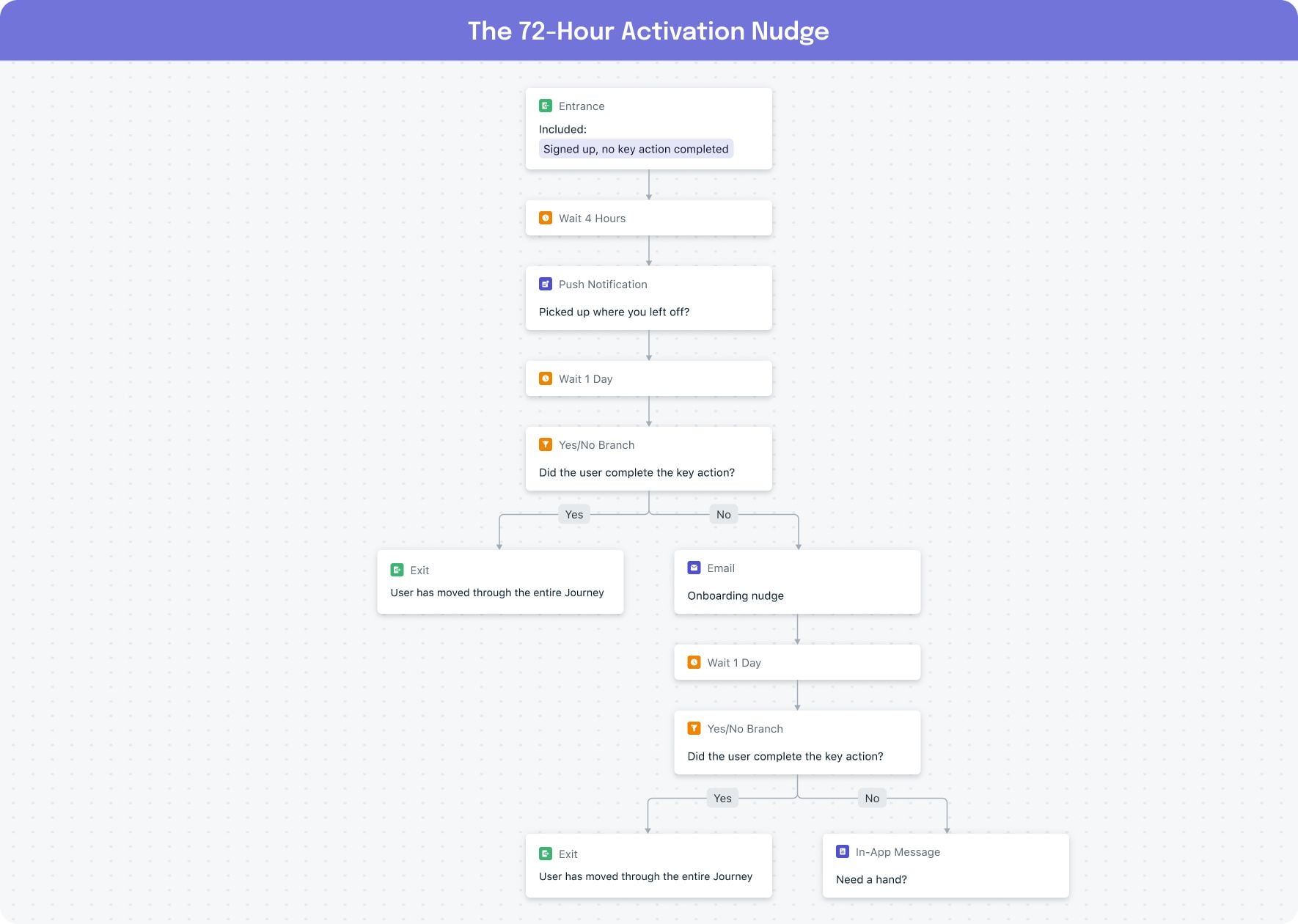
1. The 72-Hour Activation Nudge
Goal: Get a new user to complete one meaningful action (first purchase, first bookmark, first content save) within three days of signup.
Why it works: Most users who don't activate within 72 hours never will. This Journey front-loads value while intent is still fresh and adapts channels based on what's working.
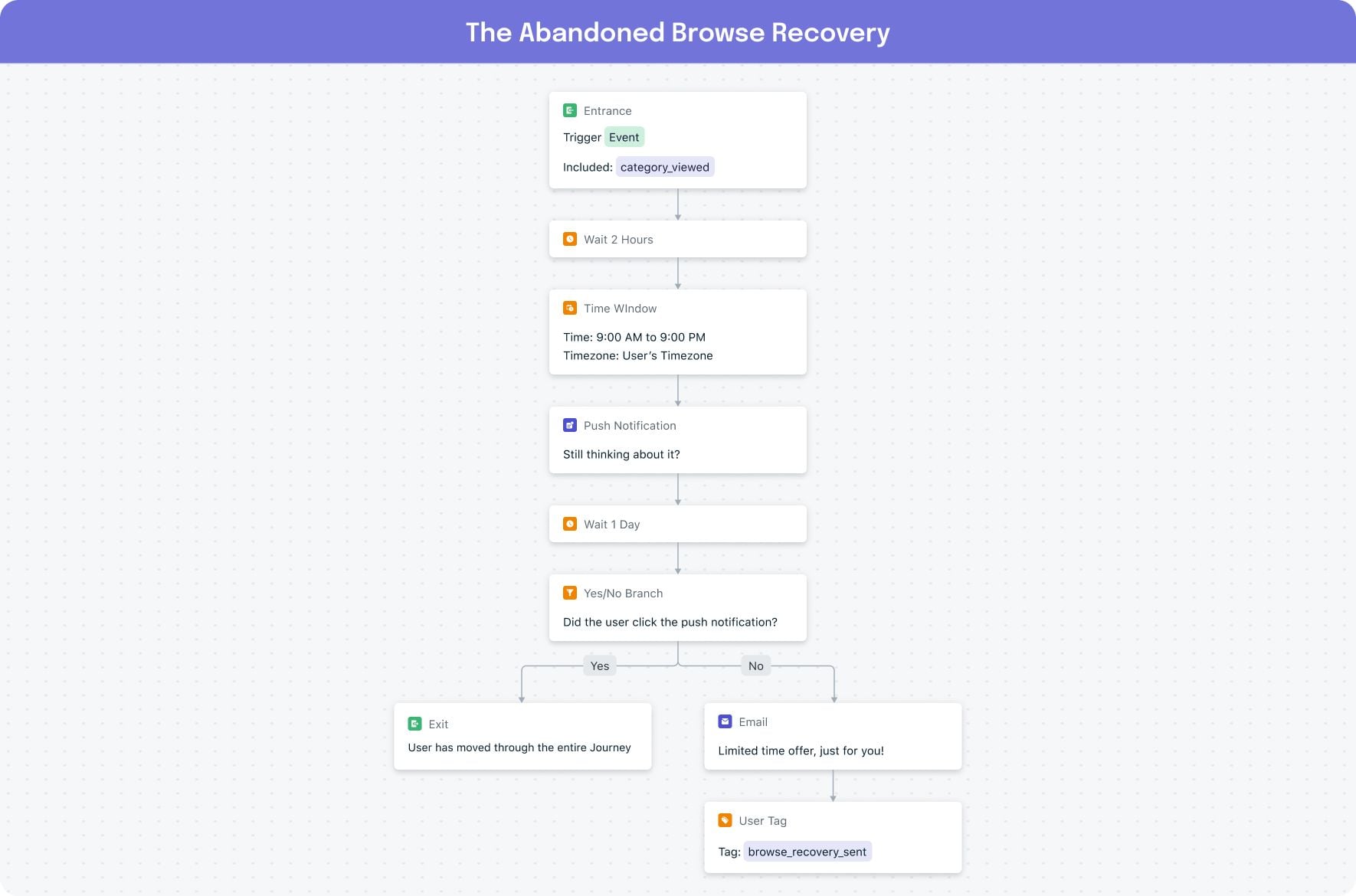
2. The Abandoned Browse Recovery
Goal: Convert a user who browsed a product or content category but left without taking action.
Why it works: Browse abandonment is earlier in the funnel than cart abandonment, so the messaging should feel helpful rather than urgent, gently re-engaging users across push notifications, email, or in-app channels through an automated messaging sequence.
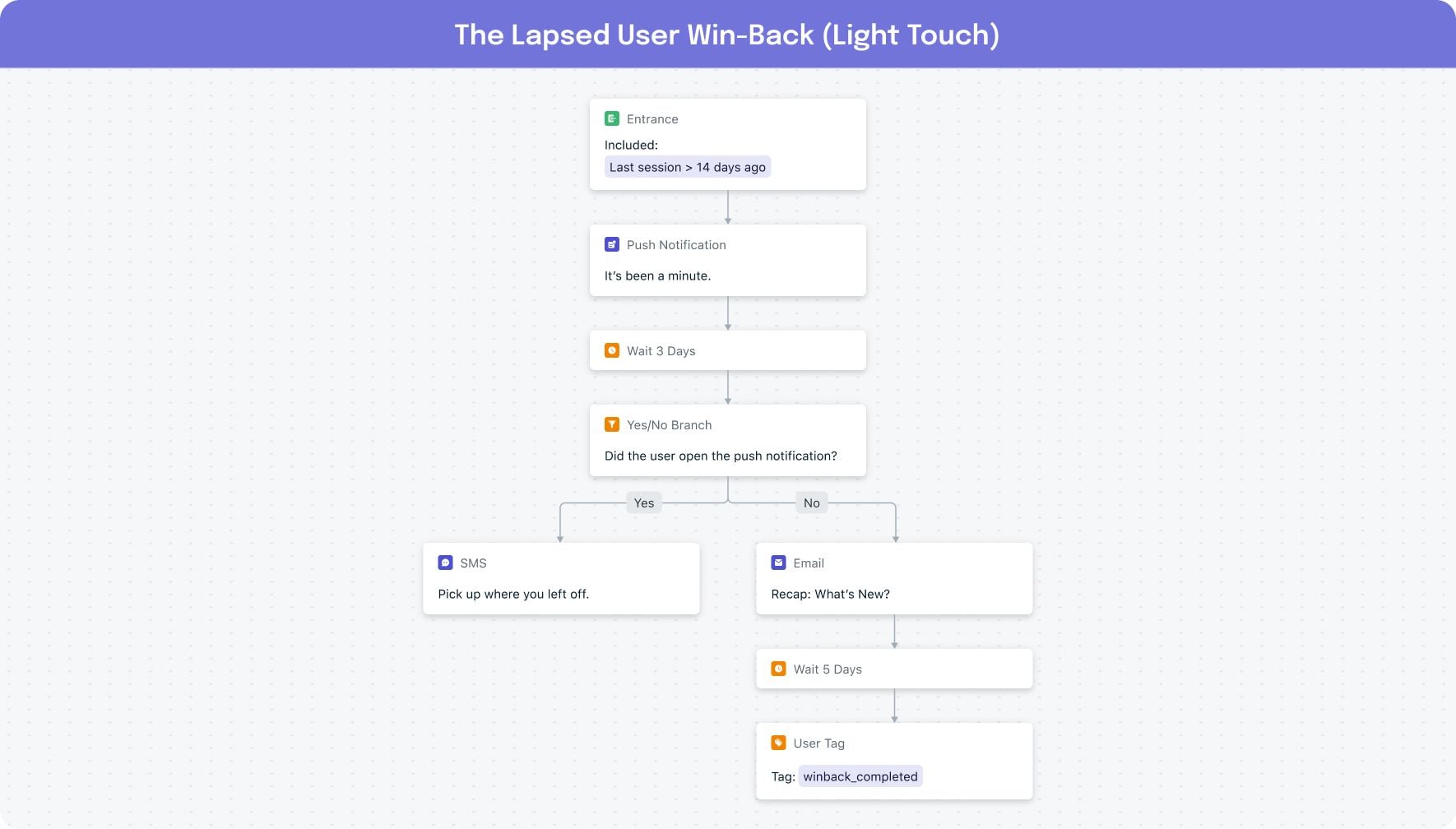
3. The Lapsed User Win-Back (Light Touch)
Goal: Re-engage a user who hasn't opened the app in 14+ days without being aggressive about it.
Why it works: Most win-back sequences go too hard, too fast. This automated messaging sequence leads with a low-pressure push notification, escalates to SMS only for users who opened but did not act, and automatically removes users who return on their own.
Four rules for designing micro-Journeys that actually work
1. Assume every message might be the only one they see. If a user only gets step three of your Journey, does it still make sense on its own? If the answer is no, rewrite it. Micro-Journeys should be sequential but not dependent.
2. Branch on behavior, not just time. A wait step followed by another message is a drip campaign. A wait step followed by a yes/no branch that adapts the channel or content based on what the user did? That's a Journey. Use branching logic to check for opens, clicks, and segment membership before deciding the next step, so each message reaches the right user on the right channel at the right moment.
3. Set exit conditions aggressively. The moment a user completes the goal, they should leave the Journey. Nothing erodes trust faster than getting a "come back!" push from an app you're actively using. Exit conditions based on custom events or segment membership prevent exactly that, and a well-configured customer engagement platform should make them easy to set for every Journey.
4. Use tags to coordinate across Journeys. Tag users as they progress (e.g., "activation_nudge_sent", "browse_recovery_sent") so other Journeys and campaigns can exclude them. This prevents the pile-up problem where a user receives multiple automated messages from different flows on the same day, a common failure point in multi-channel messaging platforms that lack cross-Journey coordination.
Start designing for the sessions your users want
Users have trained themselves to get what they need from an app in under a minute, and that expectation is only growing stronger. The notification tray is only getting more competitive, and the threshold for earning a tap keeps rising. We’re seeing more and more marketers designing sequences tight enough that a single touchpoint can carry its weight on its own, even if the user never sees the next one.
Micro-Journeys are how you do that at scale, and OneSignal's automated messaging tools make them straightforward to build. The building blocks you need, including cross-channel messaging, behavioral branching, time windows, tagging, and exit conditions, are already in the Journeys builder waiting for you. Start with one of the three examples above, measure what happens, and iterate from there.
Ready to build your first micro-Journey? Watch our Journeys demo to see how to set up automated, behavior-driven flows in OneSignal, step by step.
See Journeys in ActionFrequently asked questions
What is a micro-Journey in automated messaging?
A micro-Journey is a short, automated cross-channel sequence (typically 3–7 days) where every touchpoint is designed to deliver value inside a single 30-second user session. Unlike traditional drip campaigns, each message stands on its own and the sequence branches based on user behavior, not just elapsed time.
What's the difference between automated messaging and a drip campaign?
A drip campaign is a sequence of pre-scheduled messages sent on a fixed timeline regardless of user behavior. Automated messaging, done well, branches based on what the user does or doesn't do, adapting channels, content, and timing based on real-time engagement signals. The simplest test: if the next step depends on user behavior, it's a journey; if it depends only on the calendar, it's a drip.
What is the best multi-channel messaging platform for automated Journeys?
The best multi-channel messaging platform for automated journeys orchestrates push notifications, email, SMS/RCS, and in-app messages from a single workflow builder — with behavioral branching, exit conditions, and tag-based coordination across Journeys. OneSignal Journeys supports all of these natively.
How long should an automated messaging Journey run?
Most high-performing micro-Journeys run 3 to 7 days, not 30. You're working with a narrow window of intent, and the longer you stretch the sequence, the more users leak out. Use exit conditions aggressively so users who complete the goal stop receiving messages immediately.
How do you prevent users from getting too many automated messages?
Tag users as they progress through each journey (e.g., "activation_nudge_sent") so other Journeys and campaigns can exclude them. Combined with aggressive exit conditions — removing users the moment they complete the goal — this prevents the pile-up problem where a user receives three automated messages from three different flows on the same day.
What makes a customer engagement platform different from an email service provider?
An email service provider (ESP) handles email delivery and basic campaign management. A customer engagement platform orchestrates multiple channels (push, email, SMS, in-app) inside automated Journeys, with behavioral branching, real-time segmentation, and unified user data across channels. Shorthand: ESPs send messages; customer engagement platforms design experiences.