It doesn't really matter whose customers we’re talking about. All of us have been trained to say no when it comes to letting mobile notifications into our lives. Cookie banners, location requests, and tracking pop-ups have made "Don't Allow" too easy a choice.
Your app is one of dozens on someone’s home screen, many already muted, all competing for the same sliver of attention. What will make yours the exception?
The permission prompt moment is one of the highest-stakes in all of mobile app marketing. A yes opens a direct line to someone for as long as they stay, and a no can close it for good. Everything downstream of that notification permission, from onboarding nudges to win-back flows, depends on reach you earned or lost in those precious few seconds.
The apps that win this moment tend to say something specific. Here's how to work out what that “something” is for your app, when to say it, and how it sets you up for a long and mutually valuable relationship with your customers.
You only get so many asks
Treat your permission request as a single swing. On iOS, the system prompt appears once, and anyone who declines has to dig through Settings to change their mind. Android gives you two attempts. Spend one on a cold, unexplained question and you can't get it back.
This reaches well past week one. Reachable users are the foundation of every retention message you'll send, which is basically another way of saying your opt-in rate sets the ceiling on app retention. The best onboarding in the world can't bring someone back if you have no way to reach them, right?
So the goal here is not just a yes, but a yes your customer understands. To get there, start with what they're weighing.
What your customer is actually asking
When the dialog says your app "would like to send you notifications," your customer immediately faces three thoughts:
- What will I get? "Stay in the loop" gives them nothing to picture.
- How often will this bug me? An unknown frequency feels like handing over control.
- Can I take it back? A yes feels heavier than it should when changing it means a dreaded trip to Settings.
Specific answers beat general ones every time. Someone can imagine "we'll tell you the moment your driver is two minutes away." They can't imagine "updates." Specifics also signal that you've thought about their time, which is the trust you're asking them to extend.
Your explanation exists to answer those three questions before they're asked. Next comes when to deliver it.
Ask after they've felt something
Push notification best practices converge here. Apple and Google both recommend explaining the value of your notifications before the system prompt, and asking at first launch, before anyone understands your app, is the most common cause of low opt-in.
A sequence that works:
- Wait for a value moment: finishing onboarding, saving an item, following a topic, placing an order.
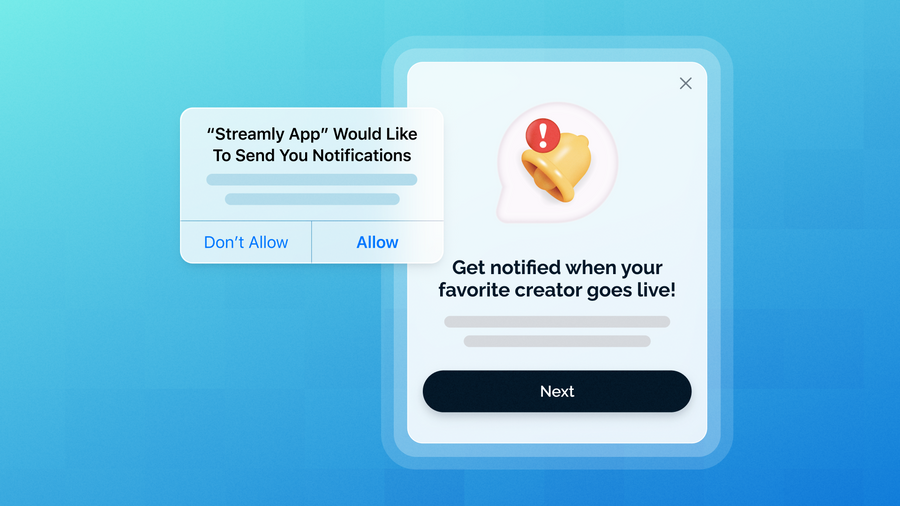
- Show your own soft prompt first: an in-app message explaining what you'll send. If someone dismisses it, the system prompt stays unused, so you can ask again later.
- Trigger the system prompt from the button they tapped, so the OS dialog feels like a follow-through on something they just agreed to.
On iOS, provisional notifications add another route. Instead of showing a permission prompt, you deliver a few messages quietly to Notification Center (no banner, no sound, no lock screen alert), and each one lets the person tap Keep or Turn Off. They judge you on real content first, and you ask for full permission once they’ve seen something useful.
The exception is an app whose value is obvious within seconds, like a ride-hailing app where knowing your driver is arriving is the whole point. In those cases, asking earlier can work.
Timing opens the door. What you say determines whether they walk through, so let's build your pitch.
Four questions that write your pitch
Each of these four questions gives you one piece of your pitch:
- What would they have to do without this notification? Check an order again and again? Remember a turn, a deadline, a saved item? The answer is your pitch.
- When will they feel it? Name one concrete moment, like "when your table is ready" or "when a price drops on something you saved."
- What are you promising, and will you keep it? Name the message types and a rough frequency, then live by both.
- How do they stay in control? Mention that they can change message types anytime. Admitting the off-ramp makes the on-ramp easier.
Compare "Turn on notifications to stay updated" with "Get a heads-up the moment your order leaves the kitchen. That's it, no promos." The second took four honest answers to write.
Your answers will look different depending on what your app does.
How your pitch shifts by vertical
- eCommerce: price drops, back-in-stock alerts, and order status, tied to something they saved or bought.
- Fintech and banking: security alerts and payment confirmations. Lead with protection, since trust outweighs convenience.
- Media and news: let people pick topics or teams. Breaking alerts about everything read as noise.
- Food delivery and mobility: live status and arrival times. The value is immediate, so ask at the first order.
- Gaming: turns, events, and rewards, plus a clear line on what you won't send, since players are wary of spam.
- Health and wellness: reminders tied to goals they set, with a plain note on what appears on the lock screen.
The same logic applies as you add channels, though the ask works differently on each.
Push, SMS, RCS, and email each need their own ask
Push: the OS owns the prompt, you own the explanation. Everything above applies.
SMS and RCS: no system prompt exists, so the consent flow is yours to design. A phone number feels more personal than a device token, so be explicit about what you'll text and how often, and honor STOP immediately. RCS adds a verified sender name and logo, which helps with "who is this?" trust, though it carries its own approval process.
Email: the ask happens at signup. Say what's coming right at the form, make your first email deliver on it, and offer preference options early.
Treat each channel's consent as its own. A yes to push doesn't carry over to texts, and asking for everything at once looks like a land grab.
Keep the promise after the yes
Your explanation is the first promise in a long relationship, and every message afterward either keeps it or erodes it. Running this well takes showing the right explanation at the right moment, re-asking people who weren't ready without using up a system prompt attempt, and seeing which version earns more yeses.
OneSignal's in-app soft prompts, iOS provisional notification support, and message reports let you build, schedule, and test exactly that without waiting on a code release. The same platform then carries the push, in-app, email, and SMS you send after someone says yes. As a customer retention platform built around the whole relationship, from the first ask to the hundredth message, it's made for apps that want people to stay because every message kept its word.
Try OneSignal free and test your first pitch this week.
Get Started for Free